
Industry 06 — Hospitality & F&B

Make the
experience begin
before the visit.

Digital experiences for hotels, restaurants, cafés, hospitality groups and food brands in Saudi Arabia. Websites and apps that carry the atmosphere of the place to the guest who has not arrived yet.

  • Hotels
  • Restaurants
  • Cafés
  • Hospitality groups
  • Food brands
A white motor yacht under way on deep-blue water beside a steep green coastline

Immersive websites

The website is the first room
a guest walks into.

Large photography, an unhurried scroll and very few words. The page is paced like the place itself, and the menu follows the guest onto the phone in their hand.

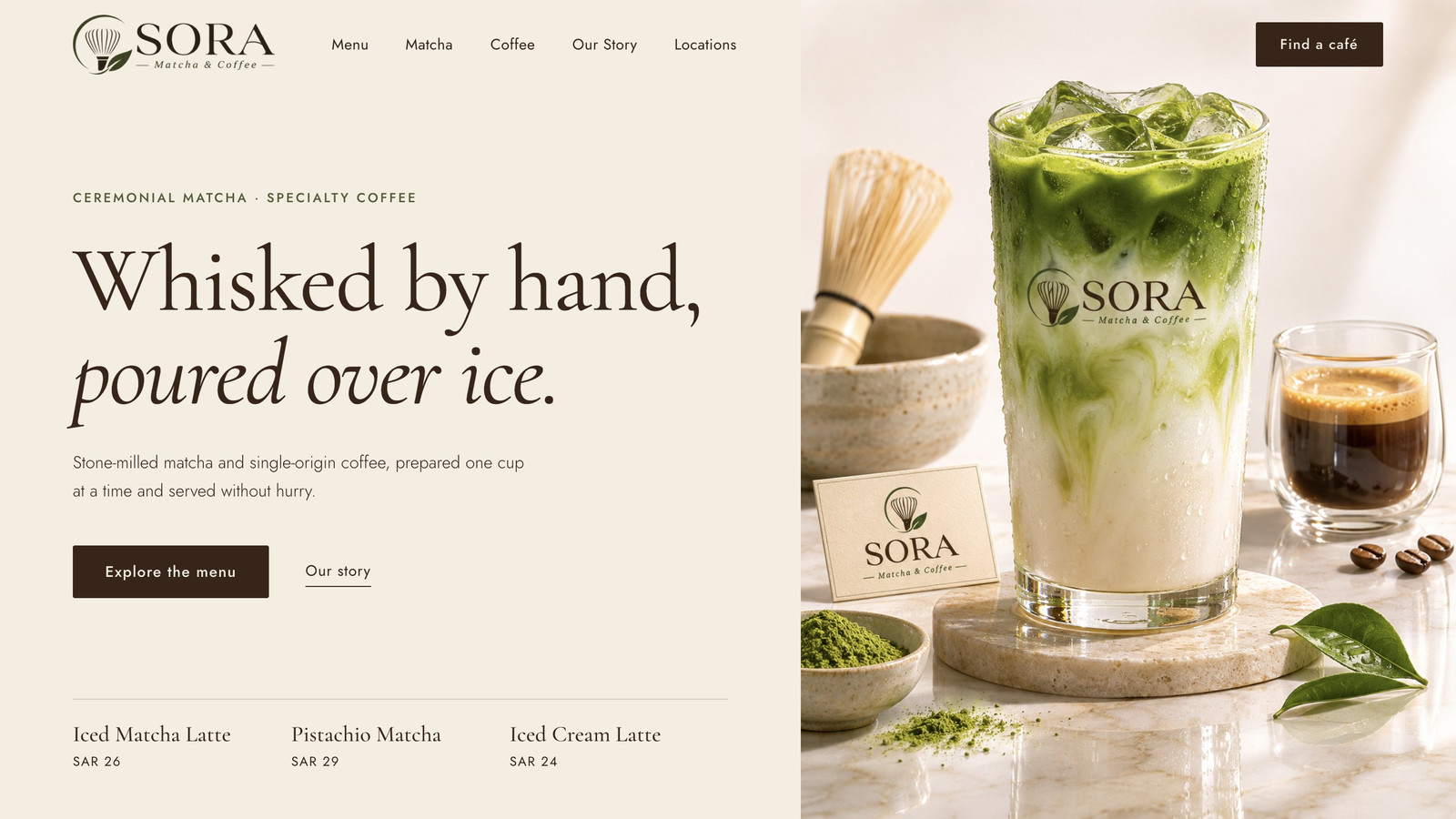
SORA Matcha & Coffee home page: the headline Whisked by hand, poured over ice, three drinks with prices and a tall iced matcha latte
Hungry Wheel menu app: a mille-feuille above an orange dial of dishes

SORA Matcha & Coffee Brand website for a matcha and coffee house

Hungry Wheel Menu app for casual dining

Digital storytelling

A guest decides how
a place will feel
long before arriving.

A steep green headland above calm blue water

The website sets that expectation. It does it through what it shows first, how quickly it moves and how it speaks, well before a table is booked or a room is chosen.

Imagery
What a guest sees first becomes what they expect to find at the door.
Pace
An unhurried scroll reads as a calm room. A crowded page reads as a crowded one.
Words
A few plain lines in the right tone say more than a paragraph of adjectives.

Sector challenges

What is easy at the table
is hard on a screen.

  1. 01

    Conveying ambiance

    Light, sound and service do not fit in a banner. Photography, pacing and tone have to stand in for them.

  2. 02

    Showcasing locations

    Each branch or property has its own address, hours and character, and each needs a page that says so.

  3. 03

    Menus

    A menu changes often and is read on a phone. A PDF that needs pinching and zooming loses the guest.

  4. 04

    Experiences

    Private dining, events, tastings and stays need room to be described, not a single line in the footer.

  5. 05

    Reservations and enquiries

    The way to book or to ask should be visible on every page and take as few steps as the business allows.

Relevant capabilities

Designed around how a guest
chooses and books.

  1. 01

    Restaurant websites

    Led by the food and the room, with the menu, the location and the way to book never more than a step away.

    SORA Matcha & Coffee home page, led by one drink: a tall iced matcha latte beside the headline
  2. 02

    Hospitality corporate sites

    For groups with several brands or venues: one parent site that introduces each brand and routes guests, partners and applicants.

  3. 03

    Hotel websites

    Rooms, facilities and surroundings shown with large imagery, and one consistent path towards availability and enquiry.

  1. 04

    Menu experiences

    Menus as real pages and app screens: sections, dishes, descriptions and dietary notes that read well on a phone.

    Hungry Wheel · Menu app

    Hungry Wheel menu app screen
  2. 05

    Location pages

    A page for each branch or property: address, hours, directions and what makes that location its own.

  3. 06

    Booking-oriented UI

    Reservation and stay-booking flows designed as interface: date, time, guests, confirmation. Any link to a booking system is assessed per project.

    Stayora · Stay-booking app

    Stayora stay-booking app on two phones: a welcome screen and a home screen with search, categories and trending destinations

Each item is scoped per project, as are development and third-party connections.

Explore Web & App Design

Before and after

The gelato did not change.
The first look did.

Gelatuno — Home page Drag to compare
After: the redesigned Gelatuno home page, a bowl of pistachio gelato at the centre of a pale peach page with one button under it
Before: the earlier Gelatuno home page, a brown slider with the bowl at one side, an opening-hours bar and three boxes
Before After

What changed

The home page, reorganised around one product and one next step.

  1. 01

    The product becomes the hero

    The bowl moves from the side of a tinted slider to the centre of a pale, open page.

  2. 02

    Six menu items become three

    Flavours, story and locations sit either side of a centred wordmark.

  3. 03

    One clear action

    Two hero buttons become one, placed directly under the bowl.

Two starting points

A first website,
or a truer second one.

01 — Design from scratch

A new restaurant or hotel, about to open its doors.

There is no old site to inherit, only an idea, a menu and a place. We design the website or app around the experience you are building, so guests can meet it online before they meet it in person.

  • Brand site and menu designed together
  • Location and opening information in place from the start
  • A booking or enquiry path planned into the layout

02 — Redesign

An established group whose site no longer reflects the experience.

The rooms were refurbished, the menu changed, new branches opened. The website stayed as it was. We redesign it around what guests find today, and keep what still works.

  • Photography and pacing brought up to the standard of the venue
  • Menus and locations restructured as pages
  • One consistent route to reserve or enquire

Related work

Casual or luxury.
The same attention.

The register changes from one project to the next. A menu app can be loud and quick. A stay-booking app should be quiet and slow.

Stayora stay-booking app on two phones: Find and book the perfect stay, and a home screen with search and trending destinations

Stayora

Stay-booking app · Hotels and resorts

Hungry Wheel menu app: a mille-feuille with its calories above an orange dial of dishes

Hungry Wheel

Menu app · Casual dining

A white motor yacht at sea, seen from above

The luxury register

Hotels, resorts and private charters ask for larger images, a slower pace and fewer words.

Questions

What hospitality teams ask us first.

Straight answers about reservations, menus, photography and languages. Anything else, write to contact@monaro.sa.

Can reservations connect to the system we already use?

The design accommodates it. We plan the booking entry points, the fields and the confirmation states so they can hand over to a reservation system. Whether your current system can be connected, and how, is assessed for each project before anything is agreed.

Can we update menus ourselves?

That is what the design is prepared for. Menus are designed as real pages built from repeating parts (sections, dishes, descriptions and dietary notes), so a change is an edit to the content, not a new design. How your team makes that edit depends on the system the website is built on, and the written specifications we hand over say what it needs to support.

Who provides photography?

The photographs are yours: taken by your photographer, or chosen from what you already have. Photography is not one of our services. The design shows where each image sits, what it needs to show and in what proportions, so a shoot can be planned around the pages.

Do you design apps for ordering or booking?

Yes. Apps are part of both our services, and the samples on this page include a menu app and a stay-booking app. We design the screens and the flow: browsing, choosing, date, time, guests and confirmation. Any link to an ordering or booking system is assessed for each project.

Can you design in Arabic and English?

Yes. We design for both languages from the start, and treat the right-to-left Arabic layout as a full version of the design, not a mirrored copy of the English one. You tell us which languages the website or app needs when we agree the scope.

Set the table
before they arrive.

Tell us about the venue, the menu and the guests you want to reach. We will come back with clear next steps.